Learning corporate motion graphics

From looking at some motion graphics inspiration in this blog Contextual Analysis- Motion Graphics Inspiration, I realised the professional looking ones were just simple revealing ones so this is what I wanted to do for the ending of Josh’s videos, so I thought I would watch the tutorial below by Justin Odisho who shows us how to make a simple text reveal in after effects.

Step one: New composition, pick whatever size and duration is relevant to what I am doing.

Step two: Layer, new solid, pick a colour (this is the background)

Step three: Layer, new shape layer, pen tool, click tool creates shape (star tool at the top), fill none, stroke set to a colour.

Step four: Creates two points with the pen tool, to centre it go to layer, transform, centre anchor point in layer content, then layer, transform, centre in view.

Step five: (TEXT LAYERS) Layer, new, text, type out the word. Place next to the centre line, then align the text vertically using the tools on the right hand side. Then copy and paste that text layer, change the text and move it to the opposite side of the line.

Step Six: (MASK) Layer, new solid, click on the solid layer, select a new mask, aline the layer mask so the edge is in the centre. Track matte section and select ‘Alpha Matte Black solid 2.’

Step Seven: (KEYFRAMING) Position click stop watch icon, drag the mask node on the timeline to the 2 second mark (depending how long you want the animation to be) then go back to the start of the timeline and move the position of the text until it is out of the mask in this case to the left, this will create another keyframe on the timeline. This creates the reveal animation.

Step Eight: Select both keyframes, right click and easy ease them.

Step Nine: (Doing the same to the other text layer) So copy the mask layer (Command,C then Command,V) Copy and paste. Drag the mask layer on the other text layer in this case over Odisho. Then select ‘Alpha Inverted Matte’ on the mask layer.

Step Ten: (KEYFRAMING) Click the stop watch icon on position. Move the keyframe down the timeline to 2 seconds. Go back to the start of the timeline and move the text position to the right so it’s off the mask. Easy Ease the keyframes. Now both text reveal.

(YOU CAN HAVE THE TEXT LAYERS APPEAR AT DIFFERENT TIMES IF YOU MOVE THE KEYFRAMES FURTHER DOWN THE TIMELINE)

Step Eleven: (Make the line reveal) Drop down the properties, transform, Scale (Keyframe) then unlink the X and Y position by clicking the chain link, decrease the Y axis to zero percent, then go further down the timeline and put the Y axis back to 100.

(IF YOU WANT THE TEXT TO DISAPPEAR THE WAY THEY CAME OUT, COPY THE KEYFRAMES THEN JUST SWITCH THEM AROUND SO THE SECOND KEYFRAME IS NOW THE FIRST ONE)

Now that I have learnt how to do a simple logo reveal I am going to practice this before I edit the video and do all the motion graphics so I know what I am doing beforehand and so the post production process is faster.

YouTube. 2019. After Effects Simple Line Text Reveal Intro Animation Tutorial. [online] Available at: <https://www.youtube.com/watch?v=3XJt9uXwMwM&gt; [Accessed 24 March 2020].

Lighting and Audio for the testimonials

In my last blog I researched how to set up testimonial shots and how to create them in this blog How to create/ set up testimonials, I learnt a lot such as using depth of field, where to position the client, where to have them looking and how to get them to say what you want them to say naturally. So in this blog, I now wanted to learn about how to light testimonials and how to get good audio so I am going to be looking at Robin Hood Studios videos as he gives some good tips.

In the video above he speaks about lighting more specifically the three-point lighting technique that is used in interviews/ testimonials. First of all, he uses just the light in the ceiling to light the scene so the whole subject is well lit but he then says if you want to make it brighter you need to add amplitude or you need to add emphasis if the lighting isn’t where you want it to be. He then says you generally light from above because like the sun you expect the light to come from above he also says if you light from below people can tell you used artificial lighting. The aim of the three-point lighting setup is to go around the person you are interviewing and make sure there are no shadows on the persons face and to make sure the three lights are equally well lit to there are no shadows. The reason he recommends using an exterior light is because it makes the background look dark, so having an extra light above or in the background helps make it brighter and more appealing in my opinion.

he then says if you don’t want to use the exterior light then you can move the 3 lights around so you have one key light which is a front-facing light towards the person. Then you have two either side of the camera pointing towards the person from above.

I now want to look into how to mic loan interview which is another video on the Robin Hood Studios YouTube Channel.

He suggests getting a lavaliere mic which luckily I have one he says these are good because it helps you get the audio of the person you are interviewing which is what I want as I don’t need my audio of me asking questions. He says to not clip it too close to the person’s neck because if they move their head closer down to the mic it will peak were if you just have it lower down on the persons chest it’s still close enough to pick up good audio and you can’t tell they have moved there head.  Then you run the wire on the inside of their top so you can’t see it in my case, it will then be plugged into the camera however he has a reliever so he just puts his into his pocket. As I am using a lavaliere mic I don’t need to take advice on how to set up the rest of the microphones.

Now I have watched these videos on lighting and audio I am going to practice these before I shoot the actual video so I can get them right whilst on set.

YouTube. 2018. How To Get Good Audio In An Interview | How To Use A Microphone. [online] Available at: <https://www.youtube.com/watch?v=I-B2YzvApJg&gt; [Accessed 23 March 2020].

YouTube. 2018. How To Light An Interview | Three Point Lighting Tutorial. [online] Available at: <https://www.youtube.com/watch?v=mhFVcPlURc0&gt; [Accessed 23 March 2020].

How to create/ set up testimonials

In this blog I am now going to look into how to set up a testimonial shot/ how to create a testimonial as this is one of the features in my videos, this is also something I said I needed to look into following my last blog about the development of my idea.

I have done some contextual analysis of testimonials to see what they look like and what people say in them and the analysis is here in this blog Testimonials in a promotional video.

In this video above by Chase Me Films it explains how to make an effective testimonial. He starts off by saying don’t be fake so get real clients that have used your product or service, don’t go getting actors. He then gives some good questions about what to ask the clients to get some good responses, the questions are:

What was the experience like using my product/service?

What results have you seen?

He finally says make sure you have a good editor to edit the testimonials down to the powerful parts of what your clients say.

In the video above by Robin Hood Studios he gives some great advice on setting up a testimonial video so how to layout the shot etc, this is something I need to learn so I wanted to make note of this so I could practice it beforehand.

First of all, he says to get some depth of field in the shot as just getting a wall behind is boring getting the depth with items relating to the video in the background adds good depth its also good mise-on-sene as in my case if I use the gym in the background of the testimonials in my video people will be able to see what it’s like where Josh is doing his PT classes and it’s also related to the video so it makes sense.

He then says to prepare questions in advance so you need to know what you want your clients to say and then figure out what questions you need to ask them to get them to say it. So when I am planning I need to think about what I want the clients to say about Josh so then I can think of the perfect question to get them to say what I want. He also says if you give them the questions in advance you can let them prepare themselves for what they are going to say, so I can either give them to Josh for him to send to his clients that are doing the testimonials or I can give them the questions 10 minutes before the shoot so they can still prepare themselves. My testimonials aren’t going to be that long so I know the questions don’t need to be long-winded and neither do the answers.

The next step he says is to shoot in a quiet place as sometimes you don’t realise the sounds that are being generated in everyday life, such as an air conditioner as these give off a lot of noise but you don’t realize because you block the sound out but when you come to edit the video you will notice it ruins the audio. This is a problem I may face as I am doing it in a gym where there will be other people and air conditioning so I need to pre-plan where I can take these testimonials.

The fourth tip he gives is to have your subject standing as when they are sitting they look slouchy, so if you have them standing nice and straight it looks better.

He then says to have them look off camera as if they are having a conversation with someone next to the camera as if someone is looking down the camera whilst being asked questions from the interviewer it feels unnatural.

This research has helped me learn more about testimonial videos and I now know what I need to do in order to make the perfect testimonial, at the end of the Robin Hood Studios video he says in his next videos he gives tips on audio and lighting so I am going to watch these in my next blog to help me get a well lit shot and good audio for the videos.

YouTube. 2018. How To Make An Effective Testimonial Video. [online] Available at: <https://www.youtube.com/watch?time_continue=68&v=Q_rS97esv-M&feature=emb_logo&gt; [Accessed 23 March 2020].

YouTube. 2018. 5 Tips For Shooting Video Testimonials | Shoot Better Video. [online] Available at: <https://www.youtube.com/watch?v=TbASK2FuJUc&gt; [Accessed 23 March 2020].

Development of my idea

My last few blogs have been about the narrative of videos so I could find out how narratives affect viewers and if they even do, I will list the blogs here:

The Narrative of Advertising

Driving Sales Through Video

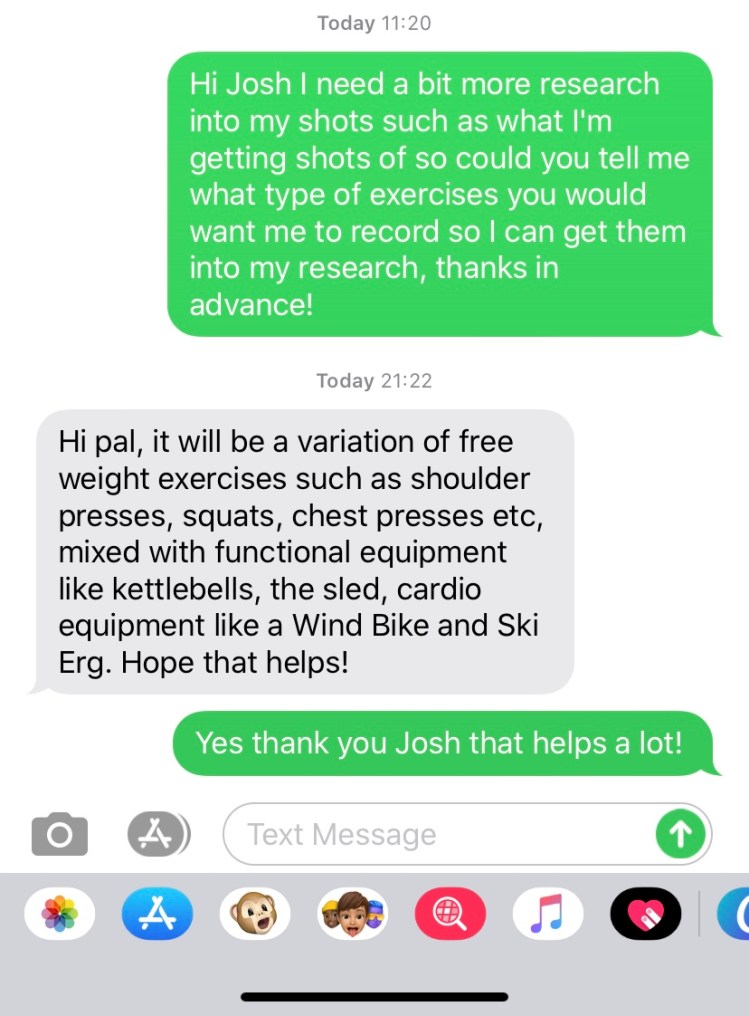
These two blogs have helped me realise that I need more of a narrative in my videos to have an effect on the audience and I need it to be relatable so they talk about it and discuss it with others and most importantly book a session with Josh, because of this I have thought out more of a narrative and I have also got Josh to send me details on what he wants shots of so I know what I am shooting. First of all, I am going to be placing a couple of quick testimonials at the start so the people will be telling the audience why they started working out and why they chose to workout with Josh, then I will capture the clients working out on the equipment Josh has said they will use in the text below. I will then end it using motion graphics to tell people to like, share and book a session with Josh.

IMG_6915

Some of the camera techniques I will be using are the fill the frame effect and I will be also using foreground, editing wise I will be using the glitch effect and masking, these are so my videos stick to the trendy traditional theme of a workout video and because in my inspiration blogs here Contextual Analysis- How to film workout promotional videos and Contextual Analysis- Inspiration- Personal Trainer Promotional Videos these techniques stood out to me and I as a video creator thought these techniques made it trendy.

I also did some research on how important storyboard planning was here Video Production- Planning and in this blog, I realised how important it was to plan shots so you’re ready for the shoot, also in the videos I was watching when learning about the foreground and fill the frame technique Daniel Schiffer mentions how important it is to pre-plan and look at what’s around you to use for foreground and look at colours in you location to do the fill the frame technique because of this research I am going to make sure I do a good storyboard that I can access on my mobile to remember what I need to shoot on set. I now need to do some more research on testimonials to learn how they are set up as it is important I also learn this before the day of the shoot.

The Narrative of Advertising

I now wanted to look into the narrative of advertising to see if narrative structures affect the audience and how they do.

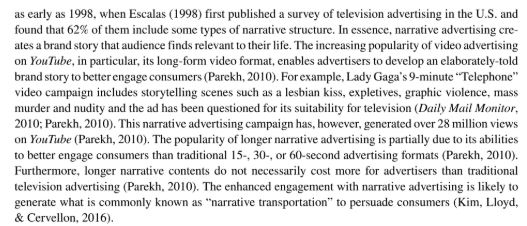
A book called Narrative Advertising states that narrative creates a brand story that audience finds relevant to their lives and with the increasing popularity of video advertising on YouTube its enabled advertisers to develop an elaborately told story to better engage the consumer.

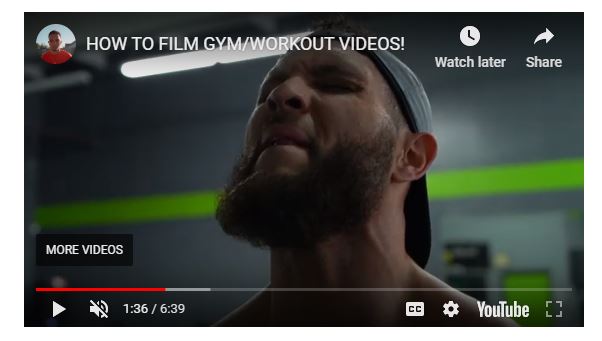
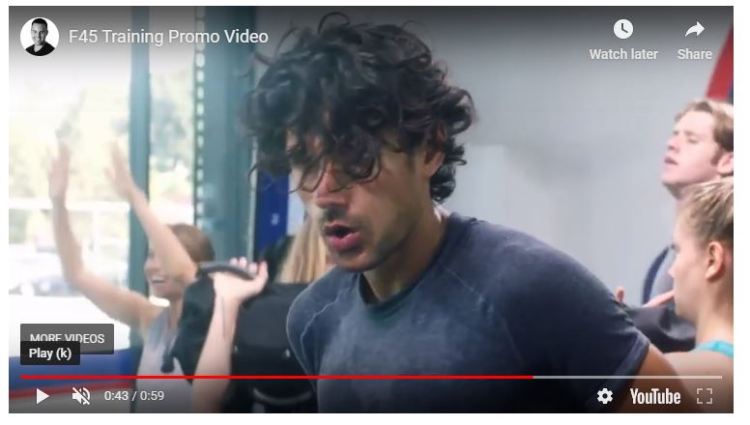
This information helps me because I know that if I plan a good narrative about working out and Josh I can attract people to booking a session with Josh. I can go down the line of getting the clients in the testimonials saying why they started working out and why they chose Josh and then go through some exercises where people are working hard so showing the toughness in a workout just like a video in my inspiration blog here Contextual Analysis- How to film workout promotional videos because the filmmaker gets right in the face of the man working out to show how hard work it is. I can then show the after effects of a workout so showing someone sweating like in my other inspiration blog here Contextual Analysis- Inspiration- Personal Trainer Promotional Videos because they show people breathing heavy and sweating after a session. This all tells a story how everyone goes through the same work to get fit so it may attract more people to do it because they can relate.

book3

Here is the close up of the man working hard because you can see it in his face and this is what people can relate to.

hard work

Here is a screenshot of a promo video from my inspiration blog where they show people sweating to tell the story so people can relate.

sweating

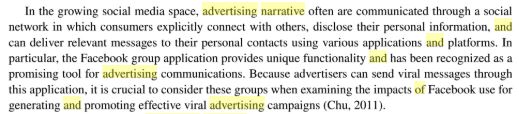
Here is another book was written by Yilmaz again about narrative in advertisements. In this screenshot, he is speaking more about how narrative advertising and how it is often spoken about in social networks where consumers connect with each other and disclose their personal information and can deliver relevant messages to their personal contact using various applications and platforms.

This to me means that when people can relate to the narrative of a video they speak about it with their social groups online. So if I make my video relatable then people will want to book with Josh and will discuss the video with others which is all part of the engagement.

book1

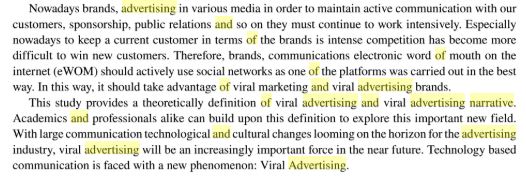
In this paragraph, it also mentions word of mouth advertising again as its saying if people can relate then they will speak about it positively which is all part of the word of mouth process that I found in this blog yesterday Driving Sales Through Video were it talks about driving sales, so it is all linked together that a good storyline, a relatable storyline can lead to sales and engagement which is why having a good narrative is important. What I am going to do now is put some of this in my contextual analysis and talk about how it has now painted a better picture in my head of what I should do for the videos.

book2

Both of these narrative books relate to the Maslow theory that I have blogged about here Maslow Theory because it is all about how what motivates human behaviour so in this case, narrating my videos in a way that people can relate will motivate viewers to talk about it and want to book sessions with Josh.

This research also links to the uses and gratification theory in some way because it’s all about what people do with media so why people seek out the media they do, I researched into this in this blog Uses and Gratification Theory. I think people will watch my video to try and motivate themselves to workout and train so if I make my narrative relatable and focus on why people chose to workout with Josh then people may seek out training off Josh so that is why I can use some of the theory from uses and grats to try and make sure people get motivated to train through my video when they watch it and especially want to book a session with Josh.

Another theory that links to the narrative structure is the Reception Theory by Stuart Hall this is because it is all about how the producer encodes their media for viewers to decode, so for this I want to encode how much of a good trainer Josh is and show his grilling workouts so people can see he works you hard and from that I want my audience to encode this so they feel motivated and want to book a session with Josh, so that is why the reception theory links to the narrative structure of my videos.

Recep, Y., 2019. Handbook Of Research On Narrative Advertising. [online] Google Books. Available at: <https://books.google.co.uk/books?id=dJGbDwAAQBAJ&pg=PA178&dq=narrative+and+structure+of+video+advertising&hl=en&sa=X&ved=0ahUKEwjLvvudv6LoAhVpURUIHarqD4sQ6AEIKzAA#v=onepage&q=narrative%20and%20structure%20of%20video%20advertising&f=false&gt; [Accessed 18 March 2020].

Recep, Y., 2017. Narrative Advertising Models And Conceptualization In The Digital Age. [online] Google Books. Available at: <https://books.google.co.uk/books?id=cSEUDgAAQBAJ&pg=PA177&dq=narrative+and+structure+of+video+advertising&hl=en&sa=X&ved=0ahUKEwjLvvudv6LoAhVpURUIHarqD4sQ6AEIMzAB#v=onepage&q=narrative%20and%20structure%20of%20video%20advertising&f=false&gt; [Accessed 18 March 2020].

Driving Sales Through Video

I wanted to do some more research on how I am going to drive sales with my videos as when I did research in this blog How to make a successful Promotional Video I realised I needed to do some research on how I can get the video to drive sales as this is one of the main aims Josh wants the videos to do, so for this I have found some research in a book called Selling All-in-One For Dummies.

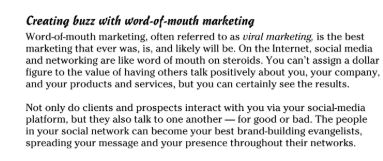
As you can see below Ihave taken a screenshot of the book below and in the screenshot it talks about creating a buzz with word-of-mouth marketing, which is often referred to as viral marketing. It states that you can’t assign a dollar figure to the value of having others talk positively about you, your compnay and your products and services but you can certainly see the results. This ties in with the testimonials I want to add into the video as from my primary research here Primary Research on promotional videos I learnt that my audience want to see testimonials and this is all to do with what the book is saying becuase having people speak about you positively attracts more customers which also means I need to think about what questions I ask as I want them to speak as highly as possible about Josh to attract more people to him. So this is one way I am going to drive sales with the video by using testimonials to promote Josh because I can show all the training he does for the whole minute and people will just be motivated but I want them to know how much of a good trainer Josh is so I need people to speak about him so thats how the testimonials come in and thats how I will attract more clients and sales through the video.

dummmies

Dummies, C., 2012. Selling All-In-One For Dummies. Hoboken: John Wiley & Sons.

Editing Techniques Research

I now wanted to look at some editing techniques that caught my eye when looking at my inspirations in these blogs Contextual Analysis- Inspiration- Personal Trainer Promotional Videos and Contextual Analysis- How to film workout promotional videos. The reason I want to do this is so I can practice it in the near future before I shoot but first I need to learn it.

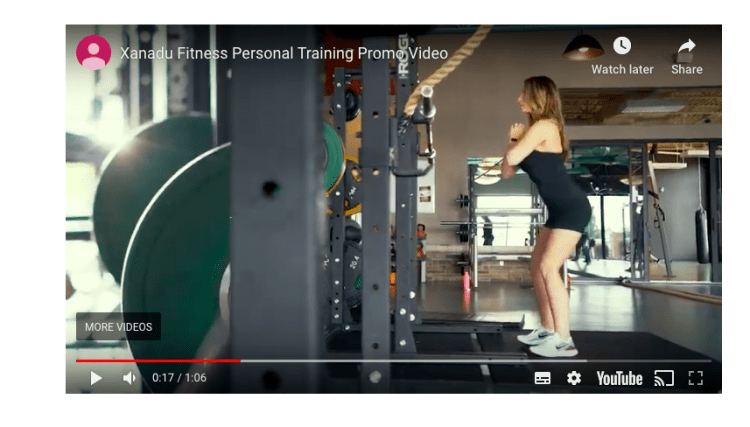
Below is the video with the mask in I will also screenshot the mask to show when it appears.

As you can see the shot is just of a woman exercising they then slowly sweep and put some foreground in the shot by sweeping behind one of the workout machines, this then masks into the next shot. So this is something I am going to research into to learn how to do it on Premiere Pro as this is the editing software I will be using.

Screenshot 2020-03-17 at 12.42.51

I have found a really good masking tutorial on YouTube that I am going to take information from. Justin says the best way to look for a masking oppurtunity is to find a perfect line from the top and the bottom of the screen so as you can see in the video it is the persons legs, just like in the workout video above the workout bar is a straight line from top to bottom. As soon as the last leg swipes across screen thats when you get the pen tool and draw a mask, when I have drawn the mask in I then need to invert it. Adding some feather to the mask gives it a softer edge so it blends in more. You then move frame by frame and adjust the mask to cover behind the person. Then you go to the very first key frame and move the mask off the screen, then if you watch it through the black mask should follow the person or object in my case frame by frame to the other side of the screen. You then drag the clip you want to mask in under the clip that you are masking.

Watching this tutorial has really helped me learn how to mask from one shot to another so I can do a smooth transition but also it brings variety to keep my audience watching.

I now want to learn about the glitch effect as when doing my inspiration research the glitch/flicker effect is something else that caught my eye as it looks trendy and this is what made me want to make a trendy style video as I love the effects. This is a screenshot og the glitch/ flicker effect it is literally less than half a second but it is very effective.

glitch

Here is the video from my inspiration blog that the flickers are in, I am now going to do some research on how to make these.

Below is a video by Peter Mckinnon, he speaks about the glitch effect in this video. First of all he goes straight into his footage and make a cut every frame and then deletes every other frame to add a strobe effect. He then dublicates a frame and drags it above itself on the track above. Then he drops the opacity on the top layer to about 50 and then positions it to one side slightly. He then goes to the lumetri tab and plays around with the highlights, contrast, exposure and tint so it looks glitched. He then adds an effect called arithmetic as it gives you your red, blue and green colour channels, he changed the operator over to max and drags the red value to 255 and drags the blending mode to linear dodge (Add), finally he positions it slightly to one side again so it isn’t covering the full bottom layer.

Another filmmaker that I have found who makes a good glitch effect is a YouTuber called Nicolas Burnage and I am going to make some notes of his tutorial below.

The effect he is making is a RGB effect (Red, Blue, Green) he starts off by making three layers one for red, one for blue and one for green. He then applies the RGB curve effects and makes the layers the colors they are by dragging down the curve of the colours he doesn’t want. He then selects the top layer and put the blend mode on screen so it blends all the highlights with the layer underneath it. He then does the same on the second layer down so the image looks the same as it did at the start.  He then cuts the top two channels which are red and blue he cuts them every three frames 3. He then does the same as what Peter did above and selects the horizontal position and moves it slightly which already makes a glitcy effect. He then selects the blue layer and drags it the opposite way and it looks really glitchy which is what I want, so he does this and moves the layers in different positions each cut to create a really good glitchy effect. He adapted the duration of it by simply shortening the frames inbetween the cut.

He then shows us another way to do the glitch effect by key framing. So first of all he selects the top layer and clicks on the stop watch next to position to add a key frame and then he just moves the position around. He then also changes the scale to bring another glitch effect in which of course glitches the subject closer. He repeats this for the blue layer but makes slight changes so its not the same postion and scale.

These tutorials have really helped me learn the glitch effects and now I feel like I can practice these, which I will do before the actual production so I know what I am doing when it comes to editing.


YouTube. 2017. TUTORIAL – RGB Glitch Effect – With Adobe Premiere Pro. [online] Available at: <https://www.youtube.com/watch?v=QMrx-BU4Hnc&gt; [Accessed 17 March 2020].

YouTube. 2017. How To GLITCH EFFECT Your Footage!! Premiere Pro Tutorial. [online] Available at: <https://www.youtube.com/watch?v=A0zy6VnjGPw&gt; [Accessed 17 March 2020].

YouTube. (2019). Xanadu Fitness Personal Training Promo Video. [online] Available at: https://youtu.be/DDBfywfCUH4 [Accessed 26 Feb. 2020].

YouTube. 2017. Slick Walk By Transition Effect – Adobe Premiere Pro CC Tutorial (Custom Wipe & Reveal With Masking). [online] Available at: <https://www.youtube.com/watch?v=f6r6UX5gWsw&gt; [Accessed 17 March 2020].

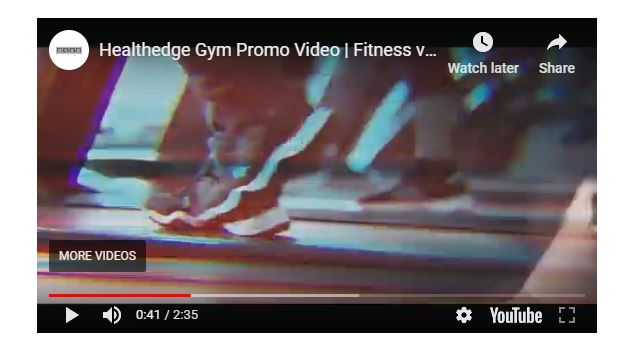
YouTube. (2019). Healthedge Gym Promo Video | Fitness video | Gym Cinematic video | Gym Motivational Video. [online] Available at: https://youtu.be/g3ZNprweps0 [Accessed 26 Feb. 2020].

Shot Type Research

In this blog, I wanted to bring several bits of research and inspiration together to help me with the production side of my video. So first of all when I was looking at my inspiration at the start of my project in these blogs Contextual Analysis- How to film workout promotional videos and Contextual Analysis- Inspiration- Personal Trainer Promotional Videos I learnt that a lot of the time they use foreground so going from behind an object and it is really effective to reveal a subject. I then have seen a filmmakers video about foreground and I wanted to piece them together as what he says in the video is some really good information on these shot types.

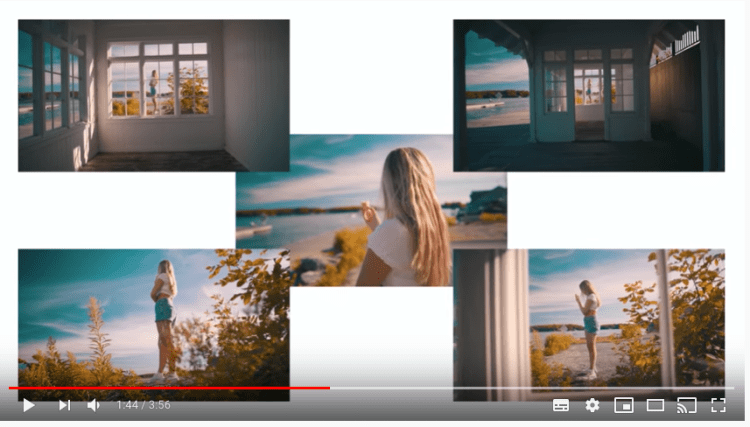
The filmmaker goes by the name of Daniel Schiffer and I take inspiration from him all the time as he really knows his stuff, but in this video especially he talks about using foreground so I wanted to add it into my work.

First of all, you can see all of his shots in the short film sequence are all using foreground and this is what he says makes a scene captivating because it can add both context and emotion to a scene. He specifically uses this as an example as they are all the same scene however they are shot in different ways so it creates a different picture in each shot. For example, the one with the leaves in the foreground adds some nature which gives some more context to the viewer on the environment the short film is being shot in. The shot was you are looking through the window at the woman gives you a whole new wider perspective to the close-up shot and he says it might make you feel differently about the person or scene.

Screenshot 2020-03-17 at 11.03.16

He then goes on to say adding foreground help’s with movement as it makes the movement more noticeable because there is something closer to the camera. He says you can also use foreground to reveal subject or scenes for a more dynamic shot and this is what links to my inspiration because this is what they do to make reveal people working out in the gym and it adds a different dynamic to just a standard shot, they then use this to move from one scene to another by going being a person or object and filling the screen with it as then when you start your next shot if you use a person or object with the same colours as the last shot you can easily cut these together when editing to make a seamless transition.

He then says that thinking ahead and planning your shots more is what makes a difference so for this I can go to the location and see what I can use as foreground so I know on the day of shooting.

I now want to look at some more shots that I noticed when looking at my inspiration, one of which was a sweeping shot or the fill the frame shot similar to what Daniel Schiffer discusses above but its more to move from one shot to another seamlessly. I am going to be using a video from Daniel again as he speaks about it really well. He starts off by saying the fill the frame transition is where you fill the frame with a certain colour or texture and then you start the next shot with the same colour or texture to add a seamless cut or less obvious cut. Daniel and his friend Pat say you need to make sure the shot that follows is similar or makes sense so in my case it will as I am doing a gym montage so I will just be going from one exercise to another but I also cannot do too many of these transitions in a row as you will make the viewer feel like they are on some sort of roller coaster. Pat says adding in harsh cuts in between these fill the frame transitions are good to add a different perspective and it also doesn’t throw the viewer off. They also go onto saying how important planning is as it makes it easier to know what you’re going to shoot from behind and what colours there are to shoot from so your not looking for this on set. They also say that if colours are similar but not the exact same that a slight film dissolve can be used in the cut to blend them together.

So these shots/ in-camera transitions are something I am going to practice before my shoot so I can perfect them, once I have done this I am going to plan my shots for the day so I know what objects and angles I can shoot from. In my next blog I am going to look at masking as I have said in my inspiration blog that that is one way they move from one shot to another by going behind the object like Daniel and Pat do but then in the video I watched in my inspiration they also masked another shot into this.

YouTube. 2018. Too Many Videographers Neglect This…. [online] Available at: <https://www.youtube.com/watch?v=6d_ieQpRIuE&gt; [Accessed 17 March 2020].

YouTube. 2020. The “Fill The Frame” In-Camera Transition. [online] Available at: <https://www.youtube.com/watch?v=KwyGOh2ukv0&gt; [Accessed 17 March 2020].

Video Production- Planning

I now wanted to get some research on video production so I can get an idea of how it is done before I get into the planning side of my project. A book I have found has some really good information about pre-planning before production so I wanted to make note of this.

storyb

The book is expressing how important storyboards are to help visualize the video or film before a shoot, they say its a visual representation of the script.

storyb1

The book also says that you can do a storyboard in different ways so you can either plan it continuously from start to finish or in sections or scenes or as a series of separate shots or action segments each showing a part of the sequence. It also says that you can either hand draw a storyboard or use software.

I have now realised the importance of using storyboards to help visualize the video I am going to produce and I think I do need to visualize it to make sure I plan it so it looks like my inspirations and it has what my audience find appealing.

why plan

I also wanted to make note of the why plan paragraph as the book is right in what it states because I need to make sure I have permission to shoot at the gym, which I already do as the Personal Trainer Josh has given me permission but I will also need to make sure I get forms for the people that are in the videos to fill out for permission, I will also need to consider who is in the background when shooting so I don’t get anyone that shouldn’t be in the shot.

All of this research has helped me realise I need to really focus on my planning as if my planning is well thought out my production will be improved because I will have everything set and ready and then I just need to do what I have planned.


Owens, J. and Millerson, G., 2012. Video Production Handbook. 5th ed. Waltham: Elsevier, pp.41 42 43 44 45.

Week 3 Summary

This week I have done a lot of work on theory such as Maslow and I have also done some more work into the history of promotional videos and how they have evolved. I also came to the decision that to up the skills I use that I was going to do some motion graphics in the videos to persuade people to like, share and book with Josh.

The Maslow Theory blog was really good because I learnt a lot about how our actions are motivated in order to achieve certain needs because in the theory it discusses that there are five needs in life which are physiological, safety, love/ belonging, esteem and self-actualization and I think a lot of these needs will be completed when people watch my videos as when they see them I want them to feel motivated to workout which then if they do this ties in with being fit and healthy.

The research on promotional videos/ advertisements helped me because it made me realise I need to make sure that my videos touch the core of my audience and have a big effect on them to get them to train with Josh or just atleast book one session which can kick start more sessions.

I also asked Josh to give me some more details on his audience such as there age and gender as I wanted to know what clients he had so I can see how I can make my promotional videos stand out to them and to others. He has mainly women that train with him but the age range is from 18 to 15 and he only has 3 males so my idea was to get women from opposite sides of the age range so one thats younger and one thats much older so people know he trains any age and then to also get one or two of the males in that he trains to try and get more men to train with him. The blog on his audience is here Target Audience.

I now did some research on the Evolution of advertising as I wanted to build on how promotional videos have changed over time however the research I found in the evolution of advertising was that the idea of telling people to click or using a rhetorical question to get them to click started in 1994 and this does still work now so this is were I got my idea to make a persuasive way of getting people to like, share and book with Josh by doing motion graphics at the end of the video.

I then did some contextual analysis on motion graphics in this blog Contextual Analysis- Motion Graphics Inspiration as I wanted to see what professional motion graphics I could make that would stand out to my audience.


Design a site like this with WordPress.com
Get started